Overview
A known issue with a Lexmark Fax Printer driver can cause System Five on Cloud to crash after 10 seconds after signing into the environment. This Cloud Remote Desktop session will continue to crash after 5 to 30 seconds.
Symptom: This started occurring after a new printer was installed along with a new fax printer driver installation.
Root Cause: Lexmark DLL LMFX1N4Z.DLL
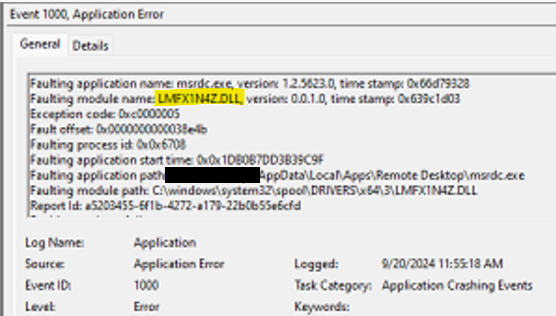
Detection: This is caused by the Lexmark dll which is LMFX1N4Z.DLL. This is a printer fax driver which gets installed after installing the driver. To confirm the cause:
- Open the Event Viewer from the Windows start menu.
- Browse through Windows Logs in recent Application events and look for an "Application Error" or "Application Crashing" event.

- Check if the crashing error is from the remote application msrdc.exe
- The error will explain the faulting module causing the crash in the event log. In this case, it was the LMFX1N4Z.DLL which is from a recently updated Lexmark Fax driver
Resolution - Replace or Delete
- Check the printer list and look for a Lexmark Fax printer.
- If this fax printer is required, contact your IT team to replace the crashing printer driver.
- If the Lexmark Fax Printer is not required. Delete the printer.
- Once the driver is removed, sign back into System Five on Cloud and monitor for 60 seconds. The remote desktop session should no longer crash or disconnect.