How to Configure Basic Windward System Five User Settings for a Mechanic
This guide explains how to configure essential Windward System Five User Security settings for mechanics. These steps ensure the technician can be assigned labor, use mechanic-specific permissions, and apply the correct labor rates on labor-type part numbers.
Windward System Five Mechanic Setup Steps
Step 1 — Open the Windward User Security Window
- In Windward System Five, navigate to: User Security → Select and Open the User Profile.
- Double-click the user account you want to configure.
Step 2 — Set the Technician’s Labor Rate
- Once User Security settings open, locate the Labor Rate field.
- If the user is a technician/mechanic, enter the appropriate mechanic labor rate.
Step 3 — Configure Permissions in the Windward Master Security Tab
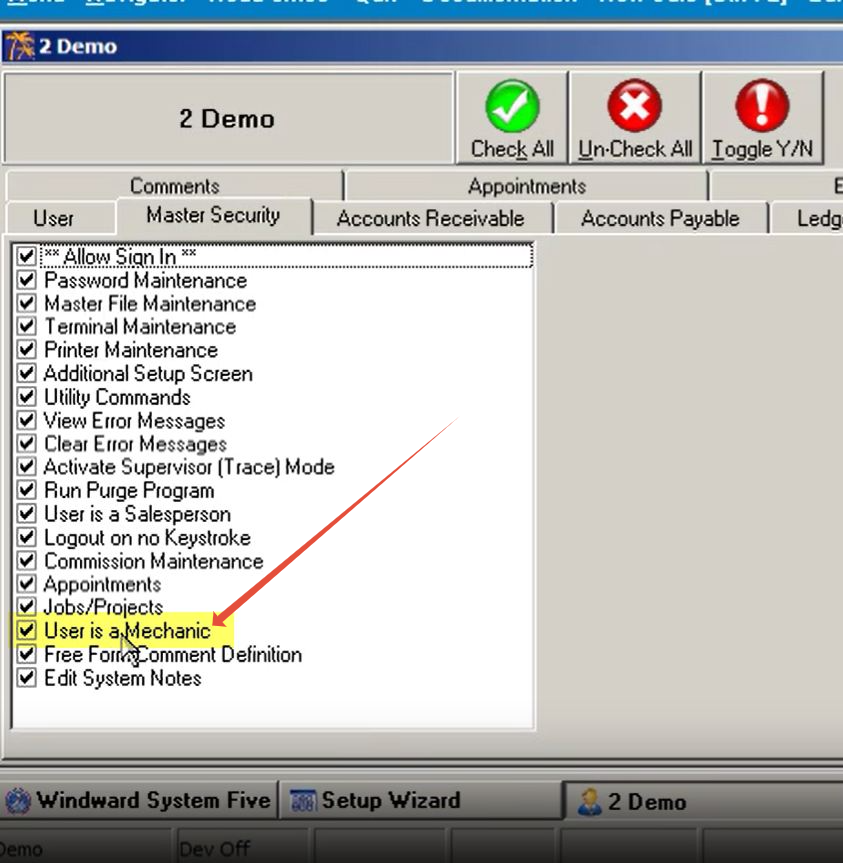
- Go to the Master Security tab inside the user’s profile.
- Review and adjust permissions as needed.
- Enable the checkbox labeled User is Mechanic to allow the system to assign this user on labor-type part numbers.